Peal Solutions
mon avis patient — a review platform for healthcare practices, built for Peal Solutions. Patient feedback arrives from Google Business, is answered in place, and is read back as themes rather than as a score.
- Discipline
- Web app design
- Role
- UI / UX Design
mon avis patient gives a practice one place for everything its patients say in public: the reviews themselves, the replies, and what the feedback adds up to once there is enough of it to read.
Peal Solutions builds it for healthcare practices, where the same screens have to serve a practitioner at one address and a group running several under one name. Reviews come in from the Google Business profile the practice already has, so the product is an extension of something familiar rather than a second place to check.
A practice does not have a reviews problem, it has a reply backlog — and the average rating, the number every tool shows first, is the one number nobody can act on.
Make the backlog the subject. Everything on the reviews page is arranged around what still needs answering, and the score is reported beside that rather than above it.
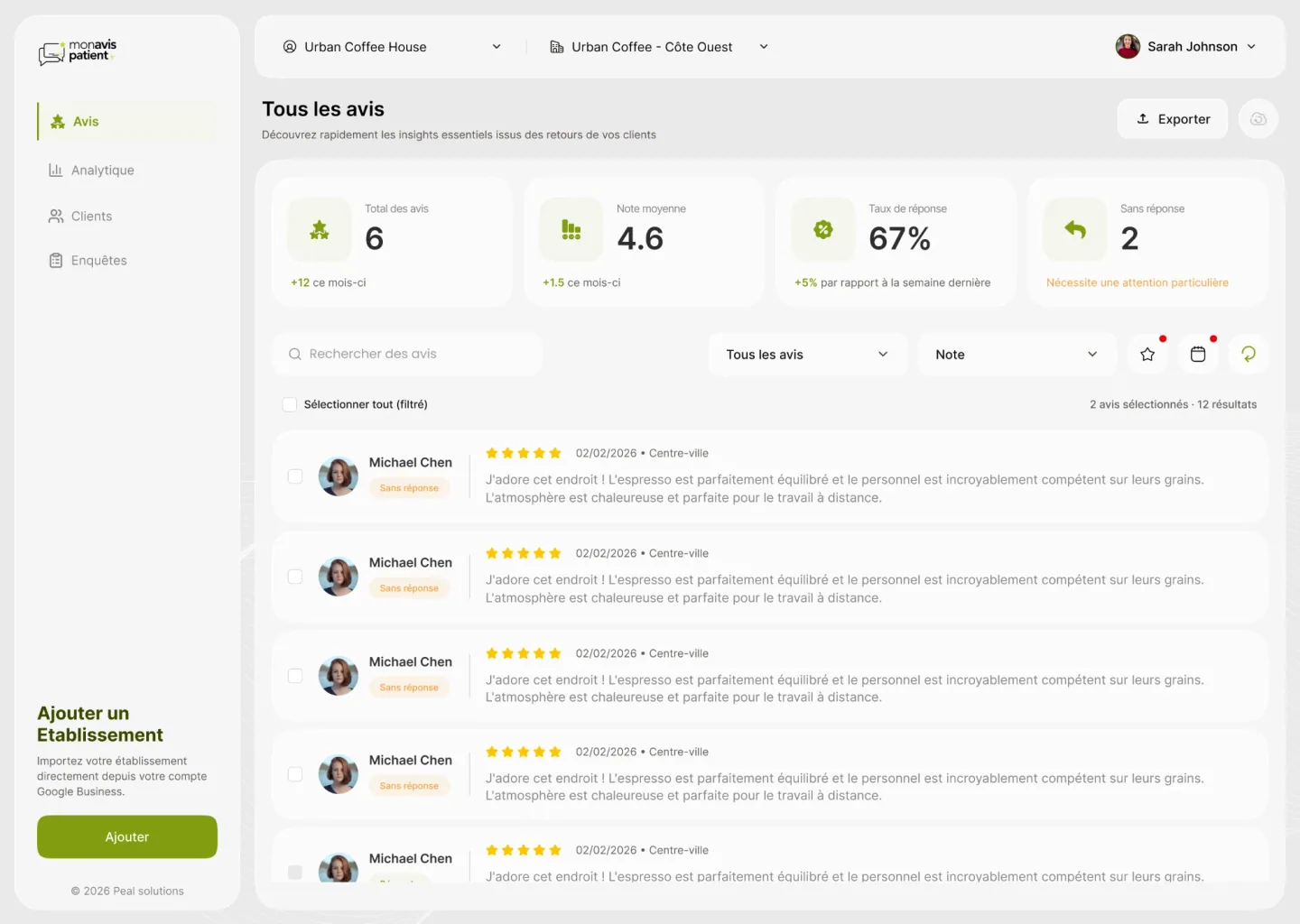
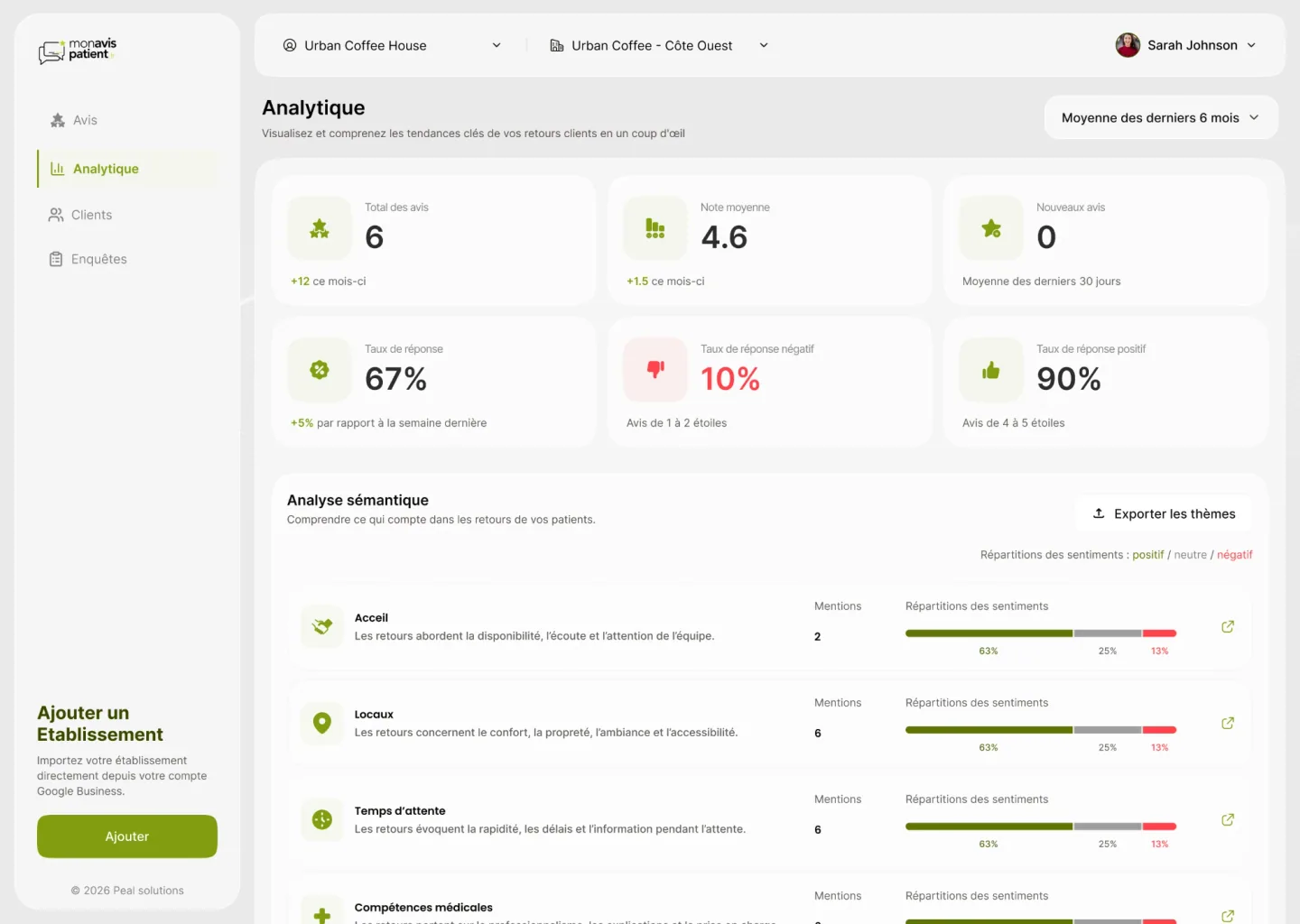
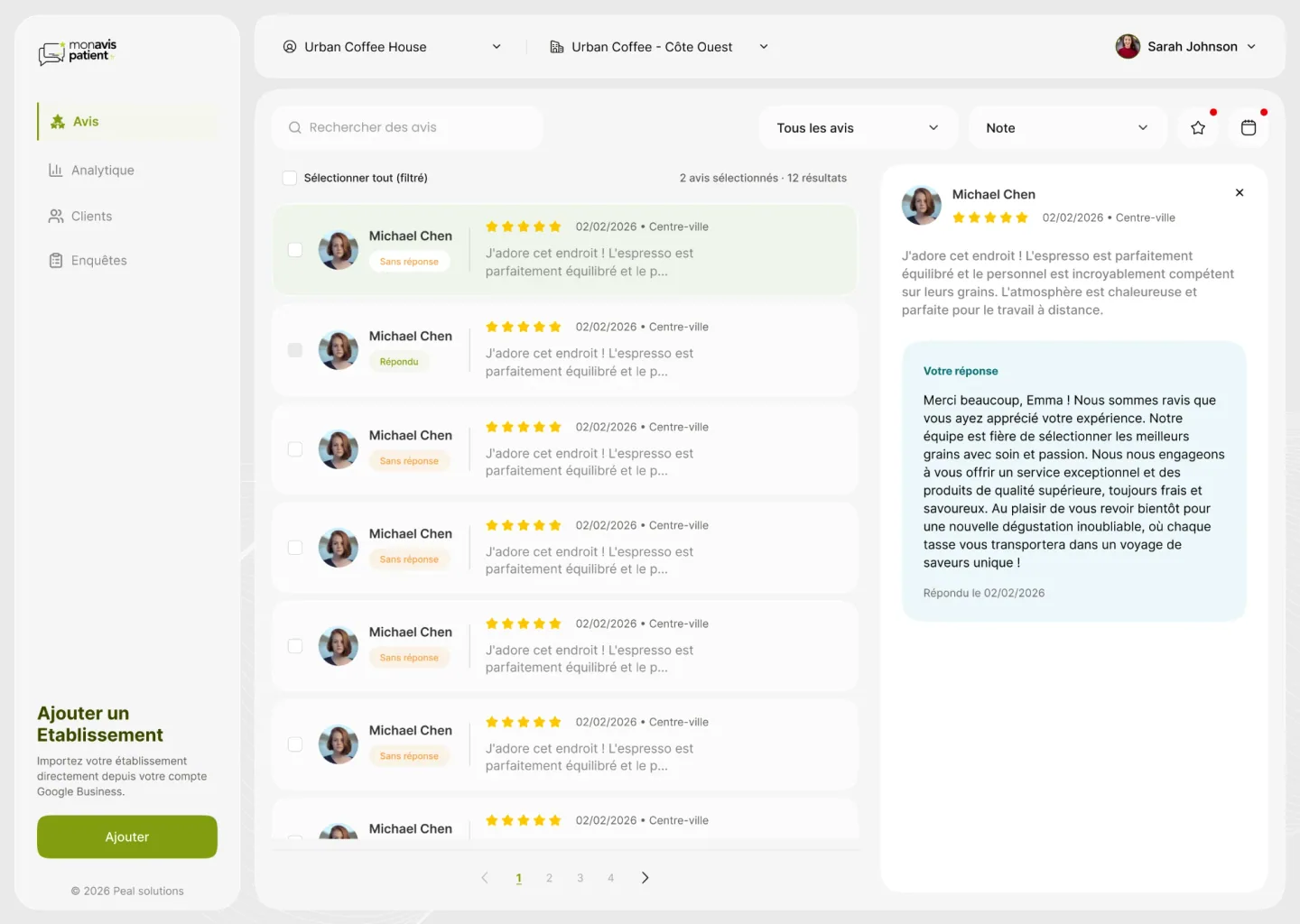
The four figures across the top of the reviews page are deliberately not a scoreboard. Three of them describe the work — the reply rate, how it moved this week, and how many reviews are still unanswered — and the average sits among them rather than over them. The unanswered tile is the only one carrying a line of plain language underneath it, because it is the only one asking for something. Replying is a queue, so the list is built to be worked down rather than browsed. Every row carries its own state, Sans réponse or Répondu, which makes the remaining work legible without reading a single review. Opening one narrows the list instead of replacing it: the review, the reply already sent and the date it went out appear beside the queue, with the row you came from still marked in it. Twelve replies is one pass down the page rather than twelve round trips. The filters above the list are the ones a backlog needs — state, rating, the ones flagged, and a date range — and the two currently narrowing the list are marked, so it is always possible to see why there are twelve results and not forty. Selection is bulk and the count says both halves out loud: 2 avis sélectionnés · 12 résultats. Selecting everything and selecting everything that matched a filter are different intentions, and an interface that blurs them is one you stop trusting with an export. The analytics page answers the other question, which is not how many but about what. Free text is grouped into the themes a practice is actually judged on — accueil, locaux, temps d’attente, compétences médicales — each with its mention count and the split between positive, neutral and negative. “Temps d’attente, 6 mentions, 13% négatif” tells a practice manager what tomorrow’s meeting is about; no average rating has ever done that. Positive and negative reply rates are separated for the same reason, and the negative one is the only tile on the page in red.
Unanswered reviews get a tile of their own beside the average, so the number that asks for work is as visible as the number that flatters.
A review opens beside the queue rather than replacing it, with its row still marked, so a morning of replying is one pass down the list.
Free-text feedback is grouped into the categories a practice is judged on, each with a sentiment split behind it, so the analytics page names a problem instead of scoring one.
The three places the work happens.

Explore the design
Want to see the work beyond the screenshots? The real file is right here.
Figma design explorer
Ready for Figma source — Peal Solutions
Development placeholder. Not rendered in production.
Design preview unavailable
The rest of this case study still is.
The number a review tool shows first tells you who it was built for. An average rating is a summary for somebody reporting upwards; a list of what is still unanswered is for the person doing the work.
Most of the design here went into resisting the dashboard instinct. It is easy to fill a reputation product with large figures that go up, and harder to make the screen say what to do next — the unanswered count given the same weight as the average, the reply opening beside the queue instead of on top of it, the negative reply rate separated out and left in red. The semantic analysis is the part I would defend hardest. Patients write about a visit, not about a service: the words they reach for — the wait, the welcome, the room — are the practice’s real scorecard, and they arrive as paragraphs. Grouping them into themes with a sentiment split behind each one turns a page of French prose into four lines a practice manager can take into a meeting, which is a different product from one that tells them they are at 4.6.